Online Patch Editor
@voerkai18n/patch provides functionality for online language pack editing, allowing users to edit language packs directly in the interface and submit them to the server.
Usage
Step 1: Installation
shell
npm install @voerkai18n/patchshell
yarn add @voerkai18n/patchshell
pnpm add @voerkai18n/patchStep 2: Initialization
Modify the languages/index.{ts|js} file by adding the following code:
ts
import { VoerkaI18nScope } from "@voerkai18n/runtime"
import "@voerkai18n/patch"

const messages = {  ... }

export const i18nScope = new VoerkaI18nScope<TranslateComponentType,TransformResultType>({
    //...
})
export const t = i18nScope.t
export const $t = i18nScope.$t
export const Translate = i18nScope.Translate- Simply importing
import "@voerkai18n/patch"is sufficient.
Step 3: Activate Editing
After enabling @voerkai18n/patch, you can call the i18nScope.patch(<true/false>,options) method to activate editing.
ts
import { i18nScope } from "./languages"

i18nScope.patch()        // Activate editing
i18nScope.patch(true)    // Activate editing
i18nScope.patch(false)   // Deactivate editing
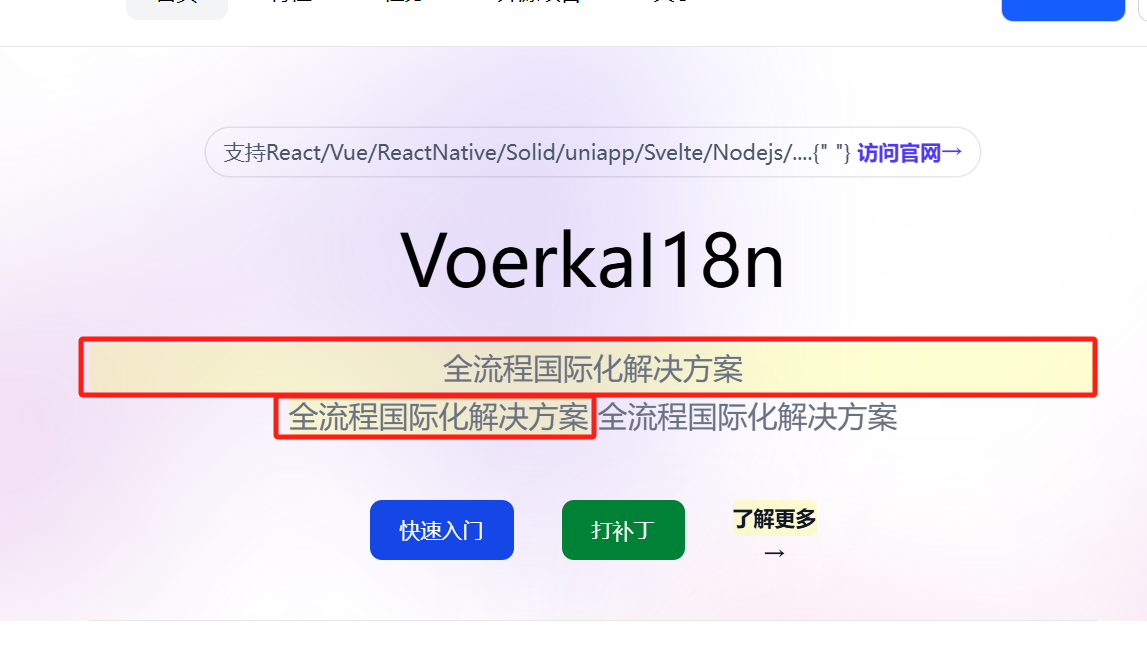
After executing i18nScope.patch, translation components on the page will display a yellow background to indicate they are editable, as shown in the image below:
Note
You can directly execute VoerkaI18n.patch(<true/false>,options) in the console to activate editing.
Step 4: Submit Changes
When editing is complete, pressing Enter or losing focus will automatically submit the changes to the server.
- Default submission address:
/api/voerkai18n/patch - Submission data format:
json
{
    "id": "<messageId or paragraphId>",
    "language": "zh-CN",
    "message": "<modified message>",
    "scope": "<scopeId>"
}
Step 5: Update Patches
When the server receives the submitted patch, it needs to update the corresponding patch file.
This step needs to be implemented by the server itself.
Summary
Once completed, you can proceed with the normal online language patch process, see Language Patches for details.
Note
@voerkai18n/patch only works with Translate components and cannot be applied to content wrapped with the t function.
This is because the translation component wraps the translation results with HTML tags.